Agentic AI is AI that works toward a goal instead of answering one question. You tell it what you want done. It finds the information it needs, decides the steps, uses your tools (email, documents, CRM), checks its own work, and keeps going until the job is done or it needs you.
A chat assistant answers and waits. An agentic system takes the next step on its own.
One thing the word does not tell you: whether the work is right, or what the system is allowed to touch. Those are separate questions. Mixing them up causes most of the confusion about agentic AI, so this guide keeps them apart.
What "agentic" means
"Agentic" comes from agency: the ability to act on your own to reach a goal. Merriam-Webster now lists it as a trending term meaning "able to accomplish results with autonomy, used especially in reference to artificial intelligence," as AP reported in November 2025.
The most useful way to think about it: agentic is a scale, not a yes-or-no label. A 2023 OpenAI paper, Practices for Governing Agentic AI Systems, describes it as how far a system can reach a hard goal, in a messy setting, without someone watching every step. Some tools are a little agentic. They pick a tool when asked. Others are very agentic. They can run a long, multi-step job with few check-ins.
So when a product calls itself "agentic," the real question is: how much of the job does it actually carry on its own?
How agentic AI works
Most agentic systems run on the same kind of AI model as a chatbot. The difference is the setup around it. Instead of one reply, the model works in a loop.
Andrew Ng, who helped make the term popular, explained the difference in a 2024 talk. Using a chatbot the normal way is like asking someone to write an essay in one go, start to finish, never pressing backspace. An agentic setup lets the AI outline, research, write a draft, reread it, and fix it. That is how people write, too.
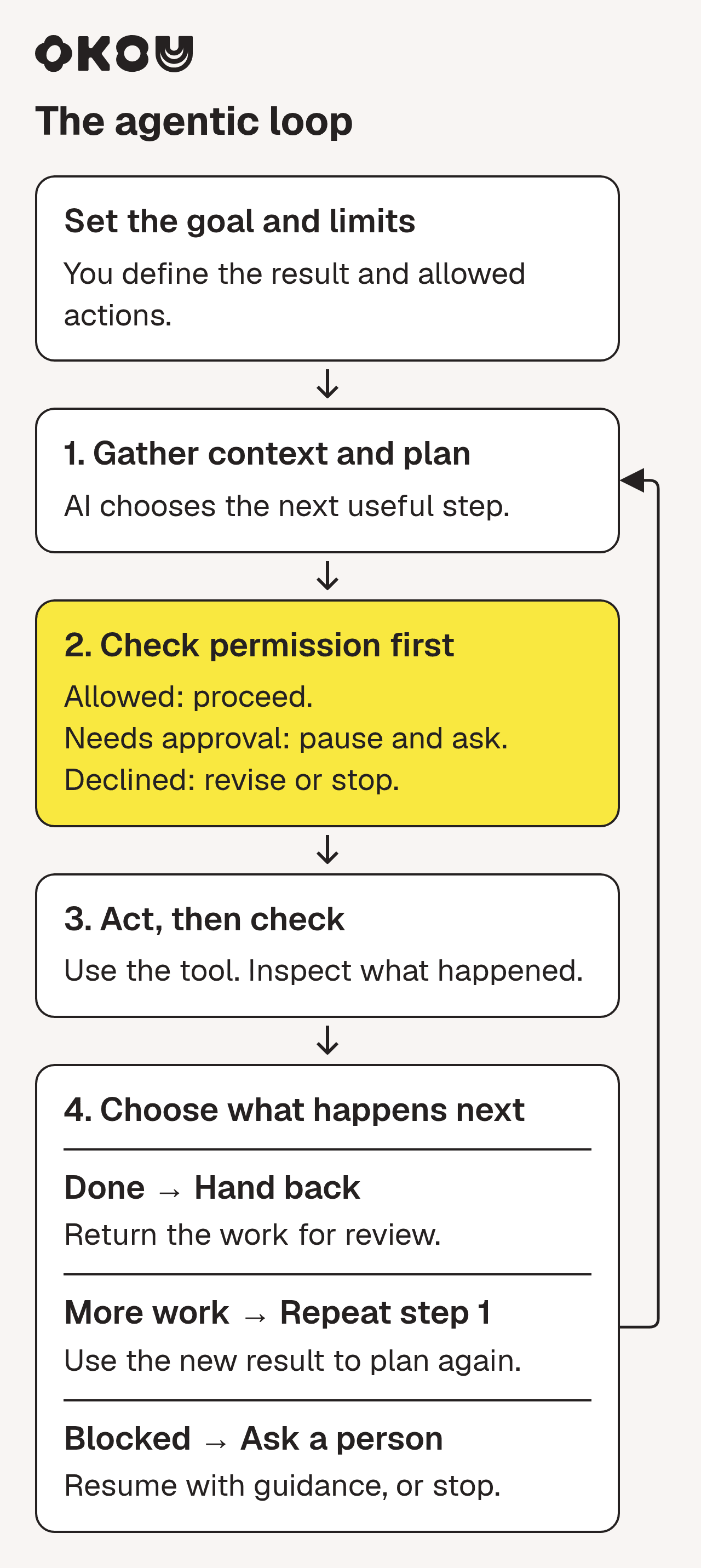
The agentic loop checks permission before acting. After each action, it hands back completed work, loops to plan the next step, or pauses for help.
Here is the loop in plain terms:
- You set the goal. Say what you want and what "done" looks like. "Prepare me for Thursday's renewal call" is a goal. "Look at this account" is not.
- It gathers context. It reads what the job depends on: recent emails, meeting notes, the CRM record. This step decides most of the quality. A good plan built on the wrong information is still wrong.
- It plans. It breaks the goal into smaller steps.
- It acts. It uses the tools it has access to: searches the inbox, opens the doc, drafts the email.
- It checks. It looks at what actually happened, not what it expected. If the CRM has no call notes, it looks in the shared drive instead.
- It hands back the work, or stops and asks. Either you get something to review, or it pauses because access is missing, the goal is unclear, or the next step needs your OK.
Step 6 includes a choice people often skip: what form the result takes. The same research can be a two-line message, a document someone can comment on, or a short deck for a meeting. A right answer in the wrong format still leaves someone else to redo the work.
Agentic AI vs. generative AI vs. automation
These three get mixed up, so here is the short version:
- Generative AI creates content when you ask: text, images, code. Then it stops.
- Rule-based automation follows steps someone set up in advance: "when a form comes in, add a row and send an email." Fast and predictable. It breaks when something doesn't fit the rule.
- Agentic AI uses generative AI inside a loop. It decides the next step itself, uses tools, and checks the result.
The easiest way to tell them apart is to ask who decides the next step. With automation, someone decided every step in advance. With a chat assistant, you decide after each reply. With agentic AI, the system decides, toward your goal and inside the limits you set.
If you prefer to watch, this short explainer covers the same split well:
YouTube · IBM Technology
Generative vs Agentic AI: Shaping the Future of AI Collaboration · April 21, 2025
A seven-minute explainer from Martin Keen on why generative AI waits for your prompt while agentic AI keeps working toward a goal.
You will also hear "AI agent" used for the same idea. Roughly: an AI agent is the thing doing the work, and "agentic" describes how it works.
Three separate questions: agency, reliability, permission
When people hear "more agentic," they often hear "better" or "more automatic." It is neither. Three different questions are hiding inside the word:
- Agency: how much does it decide on its own?
- Reliability: how often is the result right?
- Permission: what is it allowed to touch?
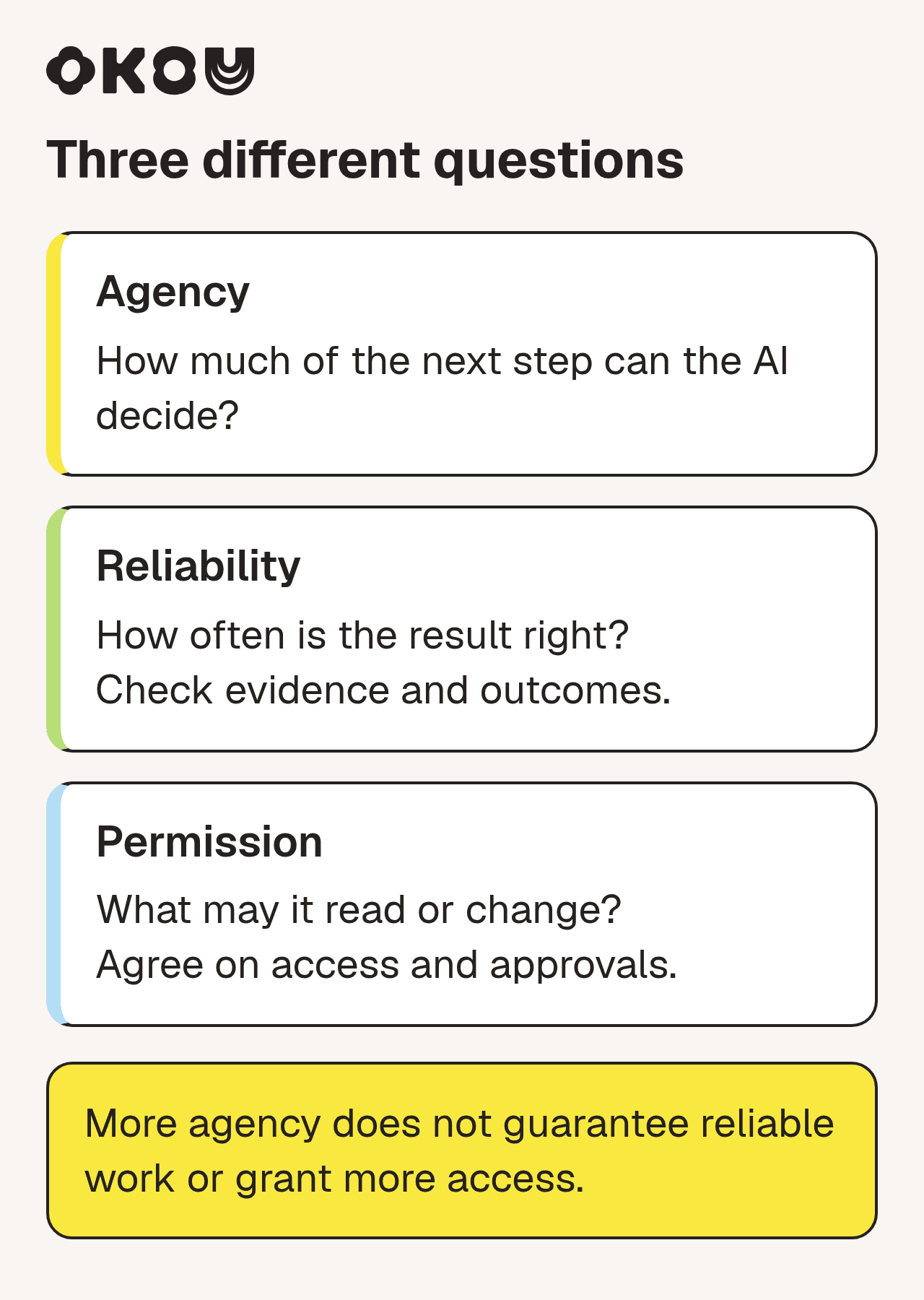
"Agentic" describes the first question only.
More agency does not mean more reliable. Every step builds on the last one. One wrong assumption early on can end up in a polished, confident, wrong report. Even people who build these systems for a living say this part is hard:
YouTube · LangChain
The Future of AI Agents with Andrew Ng | Interrupt 26 · June 17, 2026
Ng: "building agentic workflows is hard." He explains that making them reliable takes real knowledge of the business and steady testing.
More agency does not need more permission. An AI can do a lot of work on its own (reading, comparing, drafting) while being allowed to do very little that leaves the team. In the same talk, Ng points out that most company permissions were set up for people, not for AI (28:50), so this is worth deciding on purpose. Experienced users often keep it tight:
X · Simon Willison / @simonw · October 23, 2026
"I don't let my agents have production access to modify deployed services"
Willison is a well-known software developer, and he was talking about coding agents in a reply thread. The business version is the same idea: let the AI read and draft freely, and keep "send," "pay," "publish," and "delete" with a person until you trust it on that specific job.
A worked example: getting ready for a renewal call
Here is what this looks like on a real kind of task. The account, people, and details below are made up to show how the steps fit together. This is not a customer result.
The ask. An account manager tells Okou, the AI teammate we build: "Prepare me for Thursday's renewal call with Northwind, and draft the follow-up I'll send after." Okou can read her Gmail, the shared drive, and the CRM, and can create Gmail drafts. It cannot send email or change CRM records.
The context changes the plan. The CRM says the account is healthy and lists an upsell opportunity. But in the email thread, Okou finds a message from three weeks ago: the customer's ops lead says a promised integration is late and asks for a new date. Nobody replied. That one email changes the call. The brief now opens with the missed promise, not the upsell.
This is the point many people in the field keep making right now:
X · Aaron Levie / @levie · November 6, 2026
"Every AI agent deployment comes down to how successfully they can get access to the critical context to make a decision"
Levie runs Box, a company that stores business documents, so he has a stake in this view. But the renewal example shows why it holds: the AI could only spot the problem because it could read the email.
What comes back, in the right form for each person.
- For the account manager: a one-page brief to read before the call (what was agreed, what changed, three questions to settle).
- For the customer: nothing yet, just a Gmail draft waiting for review.
- For the team: a short proposed CRM note, which waits for a person to approve.
Here is what a draft waiting for review looks like in Okou (a different made-up example):
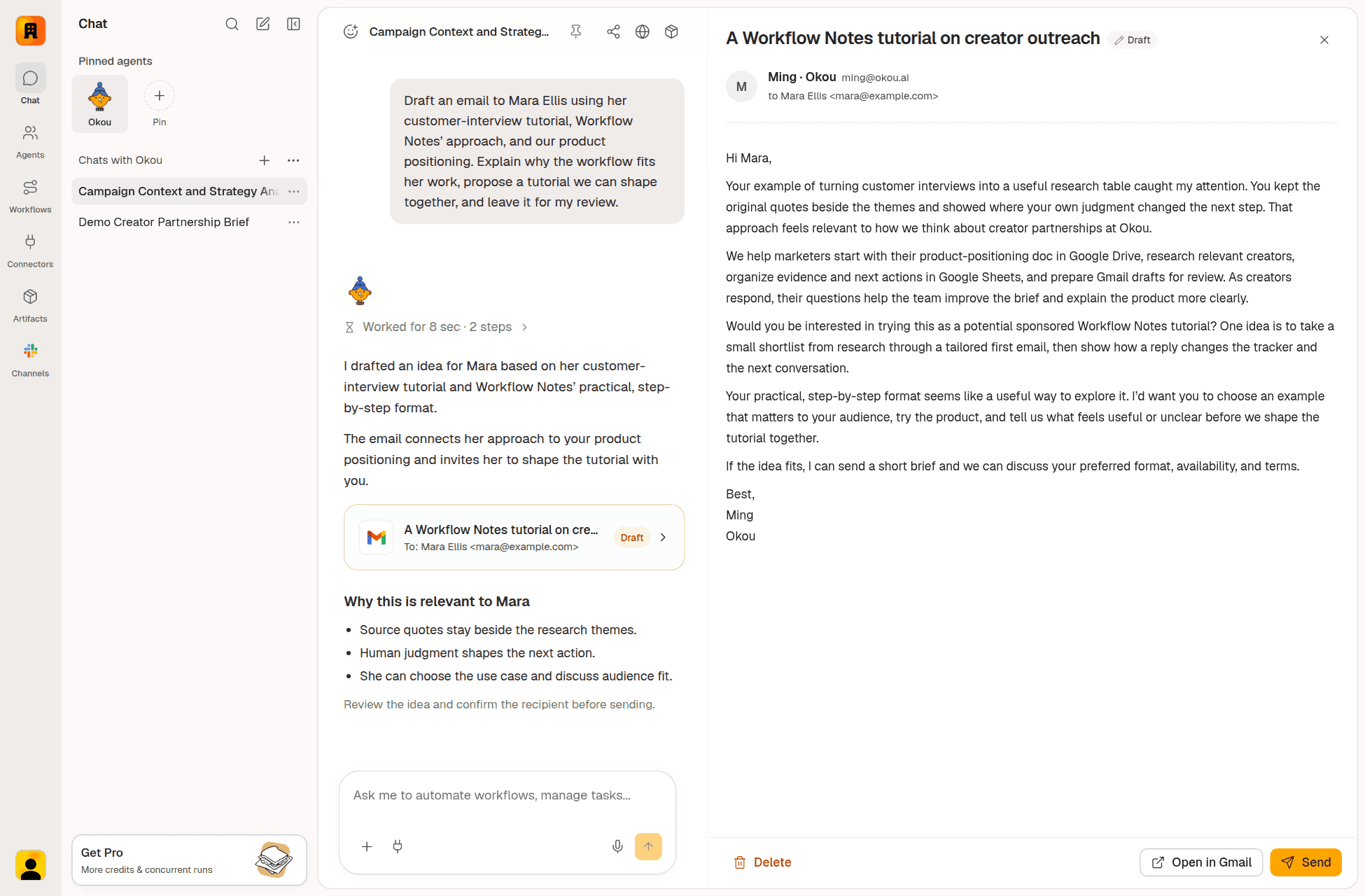
A real Okou draft waiting for review: the Gmail card says Draft, and the Send button is the person's to press. The recipient and content are fictional demo data. Open the full-size screenshot.
The person decides, then the team reuses it. The account manager asks, in the same chat, to soften the opening and cut a pricing line. Okou still has the earlier conversation, so it fixes the draft without being briefed again. She sends the email herself and approves the CRM note.
Afterwards, the team saves the method as a shared workflow (a saved, reusable way of doing a task): which sources to check, what the brief looks like, and the rule that follow-ups stay as drafts. The next account manager runs it on their own accounts, with their own access. If they want it to run every Monday for upcoming renewals, they add an automation (a schedule or trigger that starts the workflow).
Two things worth knowing. A new chat does not automatically see an old chat; you point to it if it matters. And sharing a workflow shares the method, not anyone's inbox or login. Okou's docs explain both: how chat context works and what a team shares.
When agentic AI helps, and when it doesn't
Agentic AI fits work like the renewal call: several steps, more than one tool, some judgment in between, and a result someone can check. For example:
- Ops: "Collect what each team shipped this week, flag anything blocked, and post a digest every Monday."
- Marketing: "Compare last month's campaign results with the brief and draft next steps for review."
- Sales: "Score this week's inbound leads against our ideal customer and tell me who to call, with reasons."
- Customer success: "Group this month's tickets by cause and draft updates for the three accounts with the most open issues."
More examples by team: AI agent use cases.
It is the wrong tool when a job follows the exact same steps every time (use plain automation, it's cheaper) or when you only need one answer (use a chat assistant).
Analysts have been warning about overuse for a while. In June 2025, Gartner predicted that over 40% of agentic AI projects would be canceled by the end of 2027 because of cost, unclear value, or weak risk controls. That is a forecast, not a measured result. In July 2026 it made a related call for sales teams: by 2028, AI agents will outnumber sellers ten to one, yet fewer than 40% of sellers will say agents made them more productive. Same lesson: more agents do not automatically mean better work.
One habit to change: agentic work can take minutes, not seconds. Give a clear goal, then judge the result, the way you would with a colleague.
How to stay in charge
The useful question is not "how autonomous is it?" It is "which decisions does it make, and which come back to me?" You stay in charge in three places.
What it can reach. Give access only to what the job needs. In Okou, you grant access one tool and one action at a time, and choose how long it lasts. So Okou can be allowed to write a Gmail draft without being allowed to send it. See Okou permissions.
What needs your OK. Risky actions should wait for a person. When Okou needs a new permission, you see exactly what it is asking for before anything is granted:
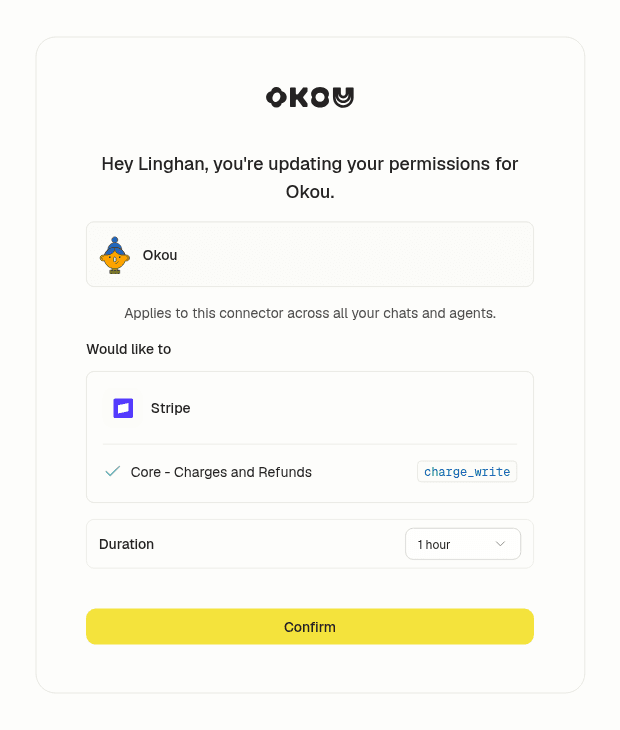
A real Okou permission request. The person sees the tool, the action, where it applies, and how long it lasts (1 hour, 24 hours, 7 days, or always) before confirming. Open the full-size screenshot.
What you review. The work should come back as something you can read and change, with a record of what the AI did.
Is "a human in the loop" enough?
Not by itself, and this is one of the more useful arguments going around right now.
YouTube · IBM Technology
Human in the Loop Is Not a Governance Strategy for Agentic AI · October 11, 2026
Phaedra Boinodiris: "a human reviewed it is not the same as the system is governed." In four minutes she lists what a reviewer actually needs.
Her checklist, in short: the reviewer should be able to see the reasoning, have the power to stop it, know what good looks like, and feed fixes back.
There is a second, quieter problem: the AI can shape what the reviewer thinks.
X · Ethan Mollick / @emollick · October 27, 2026
"experts working with AI agents are swayed by the positions of the AI, even if they think they are working independently"
Mollick, a Wharton professor who studies AI at work, was summarizing a study he linked. We have not reviewed that study ourselves, so take it as his reading. His advice is still practical: if your own judgment matters, decide before you look at the AI's draft. For the renewal call, that means the account manager decides what the call must achieve before reading Okou's brief.
People already see their role shifting this way. In Microsoft's 2026 Work Trend Index (published May 2026; 20,000 workers who use AI, in 10 countries), 86% said they treat AI output as a starting point, not a final answer. That is what people report, not a measure of quality, but it points the same way.
So a review is real when:
- You can see the work behind the result: sources, steps, and what changed.
- You can stop or change it: edit the draft, decline the permission.
- You know what good looks like: a brief format, a tone, a rule like "follow-ups stay drafts."
- Fixes don't get lost: if you make the same correction every week, put it in the workflow. In Okou, that happens only when someone updates the workflow; a fix in one chat does not quietly become a team rule.
More on approvals in practice: why your business needs the final say on AI actions.
Questions to ask before you hand work to agentic AI
- Can I just describe the outcome? Or do I have to spell out every step?
- Can it read what the job depends on? And does it tell me what it couldn't find?
- Can I limit what it does? Read only, or draft but not send?
- What happens when it gets stuck? Does it ask, or guess?
- Can I see what it did? Sources, steps, changes.
- Can my team reuse a good result? Under their own access?
If a product can't answer these, the word "agentic" isn't telling you much.
What this looks like with Okou
Okou is an AI teammate for business teams. You give them a job the way you'd brief a colleague. Okou gathers what the job needs from your connected tools, works through it in the cloud (it keeps going if you close your laptop), and hands back something you can review, in the form that suits the next reader: a quick message, a document, a web page, a deck, or a draft. Good methods become shared workflows, and automations run them on a schedule.
In the terms of this guide: Okou turns agency up for finding context and doing the legwork, and keeps permission where your team sets it. Learn more in What is Okou, or start for free.
FAQ
What is agentic AI in simple terms?
AI that works toward a goal in steps. You say what you want; it finds the information, uses your tools, checks its work, and keeps going until the job is done or it needs you. A chatbot answers once and waits.
What is the difference between generative AI and agentic AI?
Generative AI makes content when asked, then stops. Agentic AI uses that ability in a loop: it decides the next step, uses other tools, and checks whether the goal is met. Writing a sales email is generative. Reading the account history, drafting the email, and proposing a CRM update for your approval is agentic.
What is the difference between conversational AI and agentic AI?
Conversational AI is built to talk: you ask, it answers, you decide what's next. Agentic AI is built to get work done: you set the goal, it picks and carries out the steps. Many products do both, with a chat on top and an agentic loop underneath.
What are the risks of agentic AI?
Mostly from acting, not talking. Mistakes can stack up across steps. It can act on wrong or missing information. Broad permissions can let a mistake reach customers or money. Costs can rise because each job takes many steps. Limit access, keep risky actions for a person to approve, and review the result.
What kinds of tasks is agentic AI best for?
Tasks with several steps, more than one tool, some judgment, and a result you can check: meeting prep, weekly reports, research that ends in a draft, sorting leads or tickets. For the same fixed steps every time, use plain automation. For one question, use a chat assistant.
Is more agentic AI always better?
No. More agency means it decides more on its own. It doesn't make those decisions more accurate, and it doesn't decide what it should be allowed to do. For most business work, the best setup is an AI that does the research and drafting, and a person who approves what leaves the team.