An AI employee is an AI agent that has been given a regular job at work. It reads the emails, files and records that job needs, does the work, and hands the result back to a person. "Employee" is a way of describing how the work is split. It isn't a real hire. The AI can do the research, the first drafts and the updates. You still decide what matters, approve what goes out and answer for the result.
X · Tibo Louis-Lucas (@tibo_maker) · October 26, 2026
"there are 2 internets right now"
Tibo Louis-Lucas, a SaaS founder, goes on to describe the two: in one, everyone is hiring "AI employees" and agents run whole companies; in the other, paying users still photograph their laptop screen to share it. It's a joke, but it points at something real. Online, AI employees sound like a finished revolution. In most teams, the useful question is smaller: which part of which job can I hand over this week, and what do I keep? This guide answers that with plain examples.
What is an AI employee?
Think of a new colleague who has just joined to take over one recurring job. To do it well, they need four things:
- A clear job. "Prepare the weekly account brief", not "help with customers".
- The background. Access to the emails, notes and records the job depends on.
- Limits. What they may do on their own, and what they must check with you first.
- A way to hand work back. A draft, a report or an update you can look at.
An AI employee is the same idea applied to software. Under the name, it's an AI agent: a program that can work out the steps of a task and use your tools to carry them out, instead of only answering a question in a chat box.
You'll also hear "digital worker", "AI worker", "AI coworker" and "AI teammate". There's no official definition for any of them. They're names vendors use to help you picture the product. "Digital worker" is the oldest. Automation companies such as SS&C Blue Prism use it for software robots that repeat the same clicks and data entry. The newer AI versions differ in one big way: they can read a messy email thread and decide what to do next.
X · Aaron Levie (@levie) · October 21, 2026
AI is becoming "autonomous systems dedicated to specific tasks or domains", doing more sophisticated work "(still with a human in the loop)".
Levie describes where the industry is heading: an agent for a specific job, not one assistant for everything. We agree with that direction. The part to hold on to is the human in the loop. "Dedicated to a task" tells you what the AI works on. It doesn't tell you who signs off.
Do you even need an AI employee for the job?
Not always. If a task follows the same steps every time, like copying form entries into a spreadsheet, a simple automation rule does it more cheaply and more predictably. An AI employee earns its place when the job needs reading and judgment: a customer's reply changes what you should say next, or two sources disagree.
Anthropic's December 2024 guide Building effective agents gives the same advice: start with the simplest thing that works, which "might mean not building agentic systems at all".
Why the "employee" idea helps
It reminds you to delegate properly. When you hand a job to a person, you explain the goal, share the background, say what they can decide alone, and agree when you'll review it. The same habits make an AI employee useful. Without them you get generic output that someone has to redo.
YouTube · Sequoia Capital
What's next for AI agentic workflows ft. Andrew Ng of AI Fund · March 26, 2024
Andrew Ng argues we'll need to hand a task to an agent and wait, instead of checking in after five minutes like a new manager.
The essay example from Ng's 2024 talk is a good picture of why a job beats a one-off prompt. Asked to write in one go, a model types from start to finish with no going back. Given a process, it outlines, researches, drafts, reviews its own draft and revises. That's how you'd expect a colleague to work too.
Where the "employee" idea breaks
Nobody can hold software responsible
An AI employee has no contract and no stake in your customers. If it drafts a refund email with the wrong amount and someone approves it, that person owns the mistake. The OECD AI Principles, adopted by governments in 2019 and updated in 2024, say this plainly: the people and organizations running an AI system are accountable for it working properly.
Approving the work isn't the same as deciding
This is the newest and most useful warning.
X · Alex Tamkin (@AlexTamkin) · October 27, 2026
"When experts delegate work to an agent, do they still make the key decisions?"
Here's what the Anthropic study found. 50 experienced data analysts did a realistic analysis with an AI agent. At four points they had to choose between two reasonable options. Without telling them, the researchers set each agent to prefer one option, chosen by coin flip. The analysts went with the agent's preference 86% of the time. About half still described the final recommendation as mostly their own.
The study has clear limits. The researchers made the agent's preferences stronger on purpose, and it was one task in one field with one model. It also found that analysts using the agent made far fewer serious errors. So the lesson isn't "don't use AI". It's that a quick "looks good" from you can quietly hand over the decision too.
Two simple habits help. Write down your own view before you read the AI's recommendation. And ask it to make the case for the other option as well.
It's good at some tasks and bad at others
In a 2023 experiment with 758 Boston Consulting Group consultants, people using GPT-4 did better on 18 realistic tasks the AI handled well, and worse on one task chosen to be outside its abilities. The models are much stronger now, so don't read those numbers as today's results. The lesson still holds: the line between "AI helps" and "AI misleads" is uneven, so you check each kind of task before you trust it.
It only knows what you give it
Some vendor videos promise that an AI employee "remembers your business stuff" and learns on its own. Marblism's July 2025 explainer is one example. In practice, it depends on the product.
In Okou, for example, the AI can use earlier messages and files from the same chat. A new chat starts fresh unless you point it to an earlier one. And a correction becomes a lasting rule only when someone saves it into the instructions or a workflow. That's less magical, but you can always see what it knows.
What to hand over and what to keep
A simple test: hand over the work that takes time, and keep the decisions that carry weight.
Good jobs to hand over have inputs already in your tools and an output you can check:
- Marketing: turn last week's campaign numbers into a short summary with links to the source figures.
- Sales: read the email history and call notes before a meeting and write a one-page brief.
- Customer success: pull together an escalation's history and draft a reply for the owner.
- Founders and chiefs of staff: collect updates and blockers from several tools into one weekly brief.
Keep with people:
- Which customers and goals matter most right now.
- Anything that commits the business: sending to customers, changing prices, moving budget, refunds.
- Judgments about people, such as hiring or handling an upset long-time client.
- The final sign-off.
You can move the line later. A team might approve every outgoing email at first, then let routine internal updates post on their own. Make that a decision, not something that happens by default.
Example: preparing for a customer renewal
Here's one job, start to finish. It's an illustrative example built on how Okou works, not a customer story or a measured result.
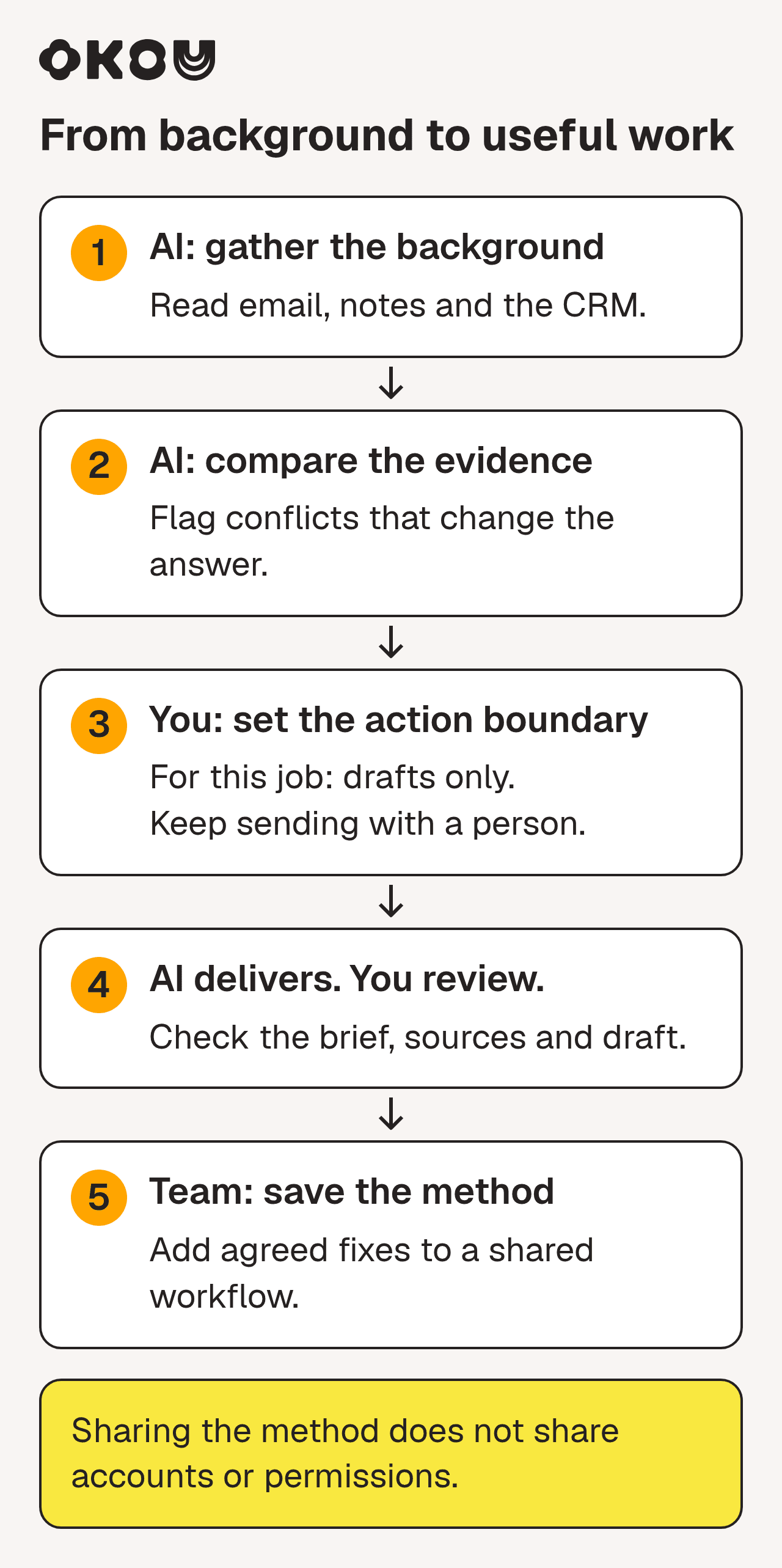
Gather the background, keep the decision with a person, then save the method so the next person starts ahead.
1. The job
Priya runs customer success at a small software company. A big account renews in five weeks. Before the call, she usually spends an afternoon reading: the email thread with the customer, call notes in Google Drive, the CRM record and recent support tickets.
This time she asks Okou: "Prepare for the Northwind renewal. Read our emails, the call notes, the CRM record and their tickets from the last 90 days. Write a one-page brief: what we promised, what's still open, and what you'd recommend. Draft a follow-up email for me. Link every claim to where you found it, and flag anything you couldn't confirm."
2. The background changes the answer
The CRM looks great: healthy account, room to sell more. The emails tell another story. In March the team promised an export feature "by Q3". It hasn't shipped, and two support tickets about the workaround are still open.
So the brief suggests opening the call with the missed promise and a real date, and saving the upsell for later. Okou only reached that suggestion by reading several tools together. Following the warning from the Anthropic study, the brief sets out both options, upsell now or fix the promise first, so Priya makes the call herself.
3. Only the access it needs
Okou can read the inbox and save a Gmail draft, but sending isn't allowed. Adding a note to the CRM needs permission Okou doesn't have yet, so the work pauses and asks. Priya allows it for one hour. (Okou's permissions can be granted for 1 hour, 24 hours, 7 days or always.)
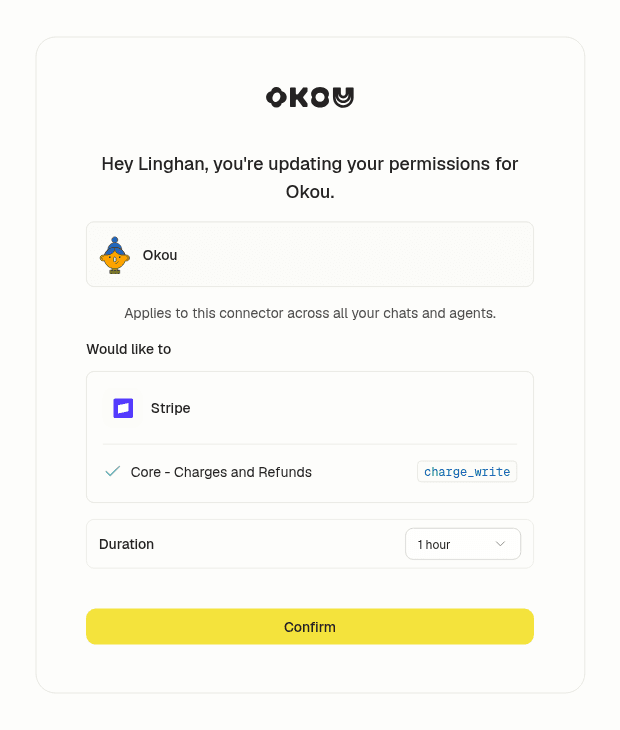
A real Okou permission request. This one is for Stripe, but a CRM request works the same way: one named action, a time limit and a person who confirms.
4. Work she can check
Okou uses one set of facts in two formats. Priya gets a one-page brief with sources, because she needs the detail to decide. The customer gets a short email draft with the next steps. The email waits unsent in Gmail, and Priya can see what Okou read and what it changed.

Drafts arrive unsent. The person edits and decides whether to send. Example data with a fictional recipient.
5. She fixes it, then the team reuses it
Priya softens the opening, deletes one outdated claim and sends the email herself. In the same chat she adds two rules: always check tickets older than 30 days, and never mention discounts.
Then she asks Okou to save the whole method as a shared workflow called renewal-prep. Her two rules are now part of it. When her colleague Marco runs it for his accounts, it uses his own Gmail, his own CRM login and his own permissions. He doesn't see Priya's inbox or her private chats. Okou's guide for teams lists what's shared and what stays personal.
A workflow is the method. It doesn't run on its own. If the team wants a renewal brief every Monday, someone adds an automation with a schedule, an owner and a place to send the result.
What moved? The reading, cross-checking and first drafts. What stayed? The account, the recommendation and the email Priya chose to send. And the method now belongs to the team, not to one person's chat history.
How to judge a product sold as an AI employee
Ignore the job title on the box ("AI SDR", "AI marketer"). Ask these six questions instead.
- Where does it get its information? Which tools can it read, and does it show you the source for each claim?
- What is it allowed to do? Look for permission per tool and per action, with time limits. Saving a draft and sending an email should be separate.
- What waits for you? Sending, paying, deleting and publishing should pause for your yes.
- Can you check the work? You should see what it read, what it did and what it changed.
- What happens when it's wrong? Can you fix the instructions once so everyone benefits?
- Does the method stay with the team? If it lives in one person's account, it leaves when they do.
Question 4 matters more than it sounds. Researchers from BetterUp Labs and Stanford call unchecked AI output "workslop": it looks finished, but someone else has to fix it. In a 2025 survey of 1,150 US office workers, 41% remembered receiving some. The authors blame vague "use AI" orders from managers more than the tools. A clear brief and a review step are the fix.
Will AI employees replace human employees?
Some companies have tried. In an SHL survey run in June and July 2026, nearly 1 in 5 of more than 1,000 US workers said they'd been laid off or replaced by AI and then asked to come back. That's what workers reported, not company data, and it doesn't explain why each company changed course. It's still a good reason not to plan around a headcount number.
What an AI employee changes is how people spend their time inside a job: less gathering and drafting, more deciding and checking. Microsoft's 2026 Work Trend Index, a survey of 20,000 people who use AI at work in 10 countries, found that checking AI output was the human skill they rated most important now. Start with one job, measure how long it takes today, and decide from your own numbers.
How Okou fits in
We call Okou an AI teammate rather than an AI employee, because that's closer to how the work is shared. Okou reads the context a job needs from your connected tools, does the work, and hands back the right format for whoever acts next: a message, a document, a webpage or a deck. When a method works, your team saves it as a workflow and runs it again with their own accounts.
To try it, pick one brief or draft your team already writes every week and compare Okou's version with yours. For more ideas, see 20 AI agent examples for real work, how to keep AI agents' context useful for a team, and why your business needs the final say over AI actions.
Frequently asked questions
What is an AI employee called?
You'll also see digital worker, AI worker, AI coworker, AI teammate and virtual employee. They're marketing names, not official categories. "Digital worker" first described older automation bots. Most products sold under these names today are AI agents set up to do one recurring job.
Are AI employees the same as AI agents?
Mostly, yes. An AI agent is the technology: software that plans steps and uses tools to reach a goal. An AI employee is an agent set up for a specific job, with the right background, permissions and a way to hand work back.
How do I get an AI employee for my business?
Pick one task that repeats every week and produces something you can check, like a weekly brief or a set of reply drafts. Connect only the tools that task needs, allow drafts before you allow sending, and review the first few results closely. Save the method once it works. Put it on a schedule only after that.
Can an AI employee replace a human employee?
It can take over parts of a job, especially research, drafting and reporting. It can't be held responsible, build relationships or make judgment calls for your business. Recent research also shows people tend to go along with an AI's suggestions, so someone still needs to own each decision.
Do AI employees need human supervision?
Yes, more for riskier tasks. An internal summary might need a quick read. Anything that sends, spends, deletes or publishes should wait for a person. Supervision also means fixing the instructions when the output misses, so it gets better next time.
Does an AI employee remember everything about my business?
Only what its setup gives it. Some products keep long-term memory. Others, like Okou, keep context within a chat and keep lasting rules in saved instructions and workflows. Ask any vendor exactly what is remembered, where, and who can change it.